
The expensive mistake in this field is not building a bad agent. It is building an agent where a prompt would have done. (An agent, throughout this post, means a program that gives a language model tools and lets it decide, step by step, how to finish a task.)
When you sit down to build one, the code is rarely the hard part. The hard part is a handful of decisions: does this even need to be an agent, what tools should it have, what should it be told, and how will you know it works. You make those decisions well once, on one project, and then three months later you make them badly again from scratch.
My fix is four Claude Code skills that hold those decisions, so the judgment sits in a folder instead of in your memory. The bundle is free to download here: github.com/madhusnagaraj/agent-skills-bundle. Below: what is in it, and how to make your own.
First, what a skill is
A skill is nothing exotic. It is a folder containing a markdown file named SKILL.md. At the top of that file is a short description. When you start Claude Code, it reads the descriptions of every skill you have installed. When you ask for something that matches a description, it opens the full file and follows the instructions inside.
That is the whole mechanism. No server, no account, no build step. A folder with a text file in it. Skills are a documented Claude Code feature, not a trick: the reference lives at code.claude.com/docs if you want the full picture.
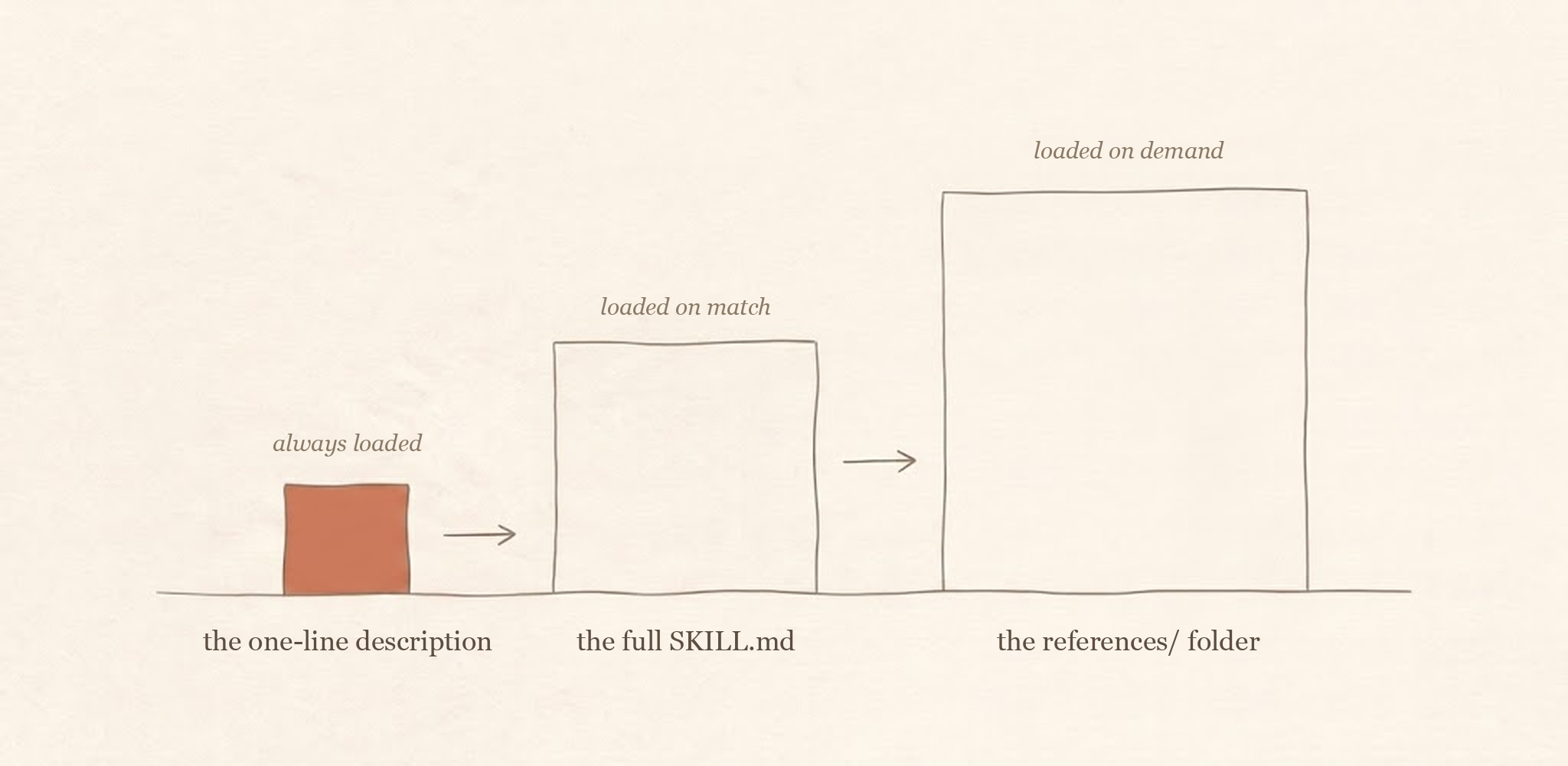
One sentence rides along in every session. Everything else costs nothing until it is used.
Two details worth knowing before you install anything:
Skills in
~/.claude/skills/are personal: they work in every project on your machine.Skills in a project’s
.claude/skills/folder travel with the repo: anyone who clones it gets them.
What is in the bundle
Four skills, one per decision:
agent-architect answers “does this need to be an agent at all?” You say “I want to build an agent that does X” and instead of writing code, it starts asking questions: what goes in, what comes out, are the steps always the same. Then it recommends the simplest design that fits, starting from a single prompt and only climbing toward a full agent when your answers force it to. Bring it a one-sentence agent idea before you have written any code; its job is to talk you down a tier.
tool-designer answers “what tools should it have?” Its main opinion: fewer tools, better described. If the agent would always call three tools in a row, that is usually better as one tool. And the description on each tool matters more than the code behind it, because Claude never sees your implementation: it chooses from the interface you expose, and the description carries most of that interface. Bring it your tool list before you build anything; expect to get a shorter one back.
context-engineer answers “what should the agent be told?” It sorts information into what should be loaded up front (small, stable, always needed) and what should be fetched only when needed (big, changing, occasional). Its default advice is to remove things, not add them. Skip this one until an agent is long-running or visibly degrading mid-session.
agent-evaluator answers “how do I know it works?” It opens by refusing test code: first it asks what success means, and for a baseline, because without measuring before your change you cannot tell better from different. Then it helps you build tests that look like real work instead of toy commands. Do not skip this rung; it is the only one that tells you whether the other three worked.
Each one behaves the same way: it asks before it recommends, it prefers the simple answer, and it pushes back when you reach for complexity you have not earned. That posture is the product. The facts inside are mostly Anthropic’s published guidance on building agents. What the skills add is the ordering and the refusals, applied every time, without you having to remember. The knowledge rides along.
To place this honestly: Anthropic’s own published skills are task skills (documents, design, building MCP servers); none of them hold the judgment calls above. The community has gone the other direction and published large reference collections on agent building, some excellent. This bundle is deliberately neither: four small skills, one per decision, each built to interview you and say no. If you want an encyclopedia, the collections are better. If you want a colleague, this is the shape.
In a real build, the order is the order above. Architecture first, because everything downstream depends on the design you pick. Tools second, because the tool surface is most of what an agent can do. Context third, once you can see what the agent actually loads per turn. Evals last in sequence but not in importance: the loop of measure, change one thing, re-run, compare is what turns the other three from opinions into decisions.
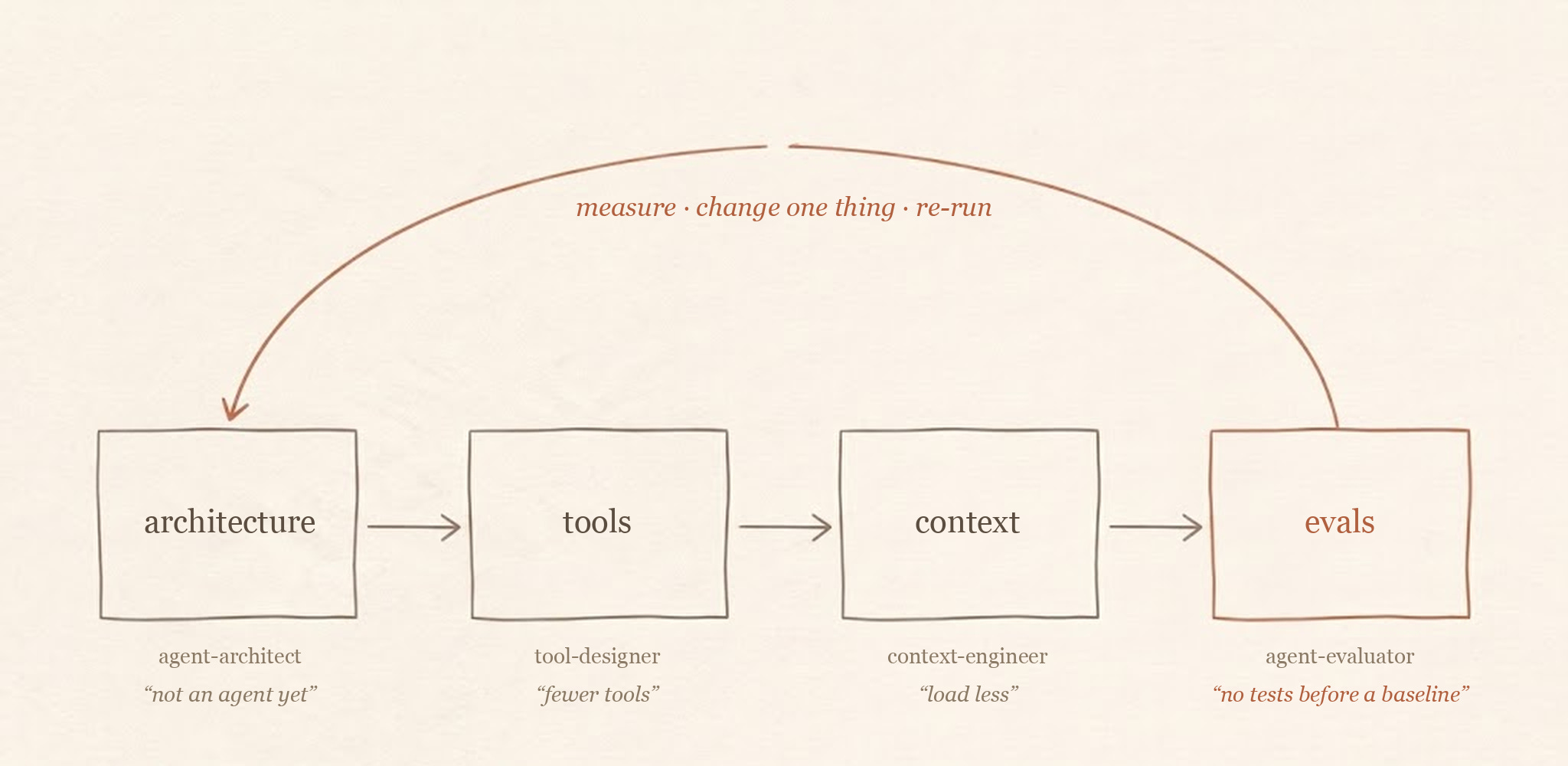
Evals are last in sequence, first in importance: the loop is what turns the other three from opinions into decisions.
Watch one work
While writing this post I ran each skill against a realistic request, both inside my own setup and in fresh command-line sessions, and kept the transcripts. Here is the real session with agent-architect, lightly abridged. I said:
I want to build an agent that tags our support tickets by category and urgency.
It did not produce code. It loaded the skill on its own and asked first: what does a ticket look like when it arrives, and where does the tag need to go? (One question turn, though it packed a few sub-questions into it; the “one at a time” in the skill is a tendency, not a guarantee.) I answered: short text emails, two labels out, same steps every time. Its verdict, verbatim:
Tier 0: a single LLM call per ticket. No agent needed. Building an agent loop, orchestrator, or pipeline for this would be pure over-engineering: more cost, more latency, more failure modes, zero accuracy gain.
Then it wrote the prompt, and told me the only place worth investing effort was the category definitions inside it. That deflating answer is the skill earning its keep: it talked me out of the expensive mistake from the first paragraph, in two turns.
The other three held up the same way under pressure. tool-designer cut my nine-tool list to six, and when I pushed seven more tools at it, it added three, absorbed three, and refused a raw SQL tool outright. context-engineer turned a 30,000-token preloaded schema into a small index plus retrieval, and declined the vector-database upgrade I dangled: measure first. The one honest miss: agent-evaluator opened by refusing to write tests until I defined success, but when I insisted, it wrote them anyway, folding the success criteria and a run-one-is-your-baseline note into the suite. The refusals are defaults, not locks. It is also the one skill you have to address in its own vocabulary: in a clean session, “write me some tests” did not wake it (a testing skill from another collection answered instead); saying “evals” or naming it did.
All four transcripts, unedited, are in the bundle repo’s evidence folder, along with the honest ledger of what the tests do and do not show.
Install it
Three commands, for macOS or Linux (on Windows, use WSL or adjust the paths). The first downloads the bundle, the second makes sure the destination folder exists, the third puts the skills where Claude Code looks for them:
git clone https://github.com/madhusnagaraj/agent-skills-bundle.git
mkdir -p ~/.claude/skills
cp -R agent-skills-bundle/skills/* ~/.claude/skills/
(No git? On the GitHub page, use Code, then Download ZIP, and unzip it. Then copy the contents of its skills folder into ~/.claude/skills/. The ~ means your home folder. The .claude folder is hidden by default; in Finder, press Cmd-Shift-period to show hidden folders, and create the skills folder inside it yourself if it is not there.)
Start a new Claude Code session and type /skills. You should see all four listed; that confirms the install. Typing /agent-architect runs one directly. The last test is the automatic one: try the ticket line above and agent-architect should pick it up on its own.
Make your own
The bundle is useful. The habit behind it is more useful. Every one of these skills was built the same way, and you can copy the recipe the moment you notice yourself giving Claude the same guidance twice.
The recipe:
Write the description as the trigger. The name and description at the top of
SKILL.mdare the parts that ride along in every session, and the description is how Claude decides when to open the rest. Put the exact phrases you would say into it. It looks like this:
---
name: my-skill
description: Use when I say "build an agent" or "is this an agent or a workflow".
---
Start with the questions, not the answers. Write down the two or three things you always have to know before you can give good advice on this topic. The skill asks those first, one at a time.
Give it a stubborn default. The best skills have a simplest-possible answer they keep returning to: use one prompt, use fewer tools, load less context. Complexity has to be argued for.
List the mistakes by name. Add a section of the specific errors you keep seeing, and tell the skill to push back when it spots one. This is what makes it feel like a colleague instead of a manual.
Keep the main file short. Put code samples and long reference material in a subfolder inside the skill (mine is called
references/). Claude reads those files only when it needs them, so they cost nothing until they are used.Pin the tone. End the file with a few lines about how to behave: ask before recommending, be honest about trade-offs. Without this, the skill slowly drifts back into generic helpfulness.
Then save it as ~/.claude/skills/your-skill-name/SKILL.md. The folder name is the name that matters; make it something you would naturally say.
Two honest caveats. First, skills are not free: every description you install rides along in every session, the one-question-at-a-time interview is tedious when you already know the answers and just want code, and the mechanics go stale as the tooling changes, so plan to prune. Second, do not sit down to write skills for their own sake. Wait until you catch yourself correcting the agent the same way a second time. The second time is the signal. Whatever you just said out loud is the first paragraph of a skill.
The method in one line: package the judgment, not the knowledge. The model already has the knowledge.
The views expressed here are my own and are not related to or reflective of my work or any organization I am affiliated with.